Skip to content
Team 5171 Docs
Search
Ctrl
K
Cancel
GitHub
Slack
Team 5171
Lock
Select theme
Dark
Light
Auto
General
About the Team
Git & GitHub Guide
Java Foundations & VS Code
Learn (FRC Curriculum)
All Curriculum Overview
Getting Started with FRC
01. What FIRST and FRC Are
1.1 What Is FIRST?
1.2 The FIRST Progression: FLL, FTC, and FRC
1.3 What Makes the FIRST Robotics Competition Unique
02. The Season and the Game
2.1 The Annual Season: Kickoff to Championship
2.2 How a Match Works: Auto, Teleop, and Endgame
2.3 Alliances, Rankings, and Playoffs
2.4 Recent Games: CRESCENDO, REEFSCAPE, and REBUILT
03. Culture, Teams, and Roles
3.1 FIRST Core Values: Gracious Professionalism and Coopertition
3.2 Sub-Teams and Roles on an FRC Team
3.3 The FRC Control System: Hardware and Software
04. Getting Started: Your First Steps
4.1 For a New Student: How to Join a Team
4.2 For a New Team: Registration and the Kit of Parts
4.3 From Zero to Robot: Tools and the First Build
05. Worked Examples & Mini-Projects
5.1 Project 1 — Make a NEO Spin with the REV Hardware Client
5.2 Project 2 — Deploy a Real Arcade-Drive Program
5.3 Project 3 — Refactor into a Command-Based Drive Subsystem
5.4 Project 4 — Build a Fuel Launcher for REBUILT
5.5 Project 5 — A One-Button Autonomous Routine
06. Common Mistakes & Troubleshooting
6.1 The Connection Chain: When the Driver Station Won't Connect
6.2 Brownouts: Why the Robot Goes Limp Mid-Match
6.3 CAN Bus Gremlins: Missing and Conflicting Devices
6.4 Software Gotchas: Inverted Drives, Scheduler Stalls, and Reading the RioLog
6.5 Inspection-Day Failures: Bumpers, Size, and Weight
07. Advanced Techniques & Case Studies
7.1 Closed-Loop Control: PID + Feedforward for a Consistent Shot
7.2 Swerve Drive: Omnidirectional Movement with YAGSL
7.3 AprilTag Vision: Knowing Where You Are with PhotonVision
7.4 Data-Driven Strategy: Scouting, EPA/OPR, and Alliance Selection
7.5 Choosing Your Hardware Ecosystem: REV vs CTRE
Mechanical, Build & Pneumatics
Prerequisites: Engineering Foundations: Forces, Torque, and Machines
P.1 Units, Measurement, and Tolerances
P.2 Force, Mass, and Newton's Laws
P.3 Torque, Levers, and Mechanical Advantage
P.4 Simple Machines and Gear Ratio Basics
01. Drivetrains: Moving the Robot
1.1 Tank and West Coast Drive
1.2 Swerve Drive
1.3 Mecanum and Other Omnidirectional Drives
1.4 Wheels, Tread, and Motors
02. Power Transmission and Gear Ratios
2.1 Why You Need Reduction: Speed vs. Torque
2.2 Chain and Sprockets
2.3 Belts, Pulleys, and Gear-on-Gear
2.4 Shafts, Bearings, and Bushings
03. Structure, Materials, and Fasteners
3.1 Aluminum Extrusion and Tubing
3.2 Polycarbonate and Other Materials
3.3 Fasteners and Threadlocking
04. Mechanisms, Fabrication, and Assembly
4.1 Common Scoring Mechanisms
4.2 Fabrication Tools and Safety
4.3 COTS vs. Custom, and Prototyping
05. Pneumatics Fundamentals: How Air Becomes Motion
5.1 What Pneumatics Is and Why FRC Teams Use It
5.2 The Two-Pressure Circuit: High Side vs Working Side
5.3 Pneumatics vs Motors: Choosing the Right Actuator
06. The Components: Controllers, Compressor, Valves, and Cylinders
6.1 Pneumatics Controllers: REV PH and CTRE PCM
6.2 Compressor, Pressure Switch, and Analog Pressure Sensor
6.3 Regulator, Storage Tanks, and Tubing
6.4 Solenoid Valves and Cylinders
07. Building, Wiring, and Programming a Pneumatic System
7.1 Plumbing the Circuit
7.2 Wiring the Pneumatic Hub or PCM
7.3 Programming Solenoids and the Compressor in WPILib
7.4 Designing with Pneumatics: Force, Stroke, and Air Usage
08. Safety, Rules, and Testing
8.1 The Pneumatics Rules: 120 psi, 60 psi, and What's Legal
8.2 Required Components and Passing Inspection
8.3 Operational Testing: Relief Valve, Pressure Switch, and Leaks
09. Worked Examples & Mini-Projects
9.1 Mini-Project 1: A Single-Jointed Arm From Math to Motion
9.2 Mini-Project 2: A Two-Stage Cascade Elevator
9.3 Mini-Project 3: A Velocity-Controlled Flywheel Shooter
9.4 Mini-Project 4: A Pivoting Roller Intake
9.5 Mini-Project 5: Integrating a COTS Swerve Module
10. Common Mistakes & Troubleshooting
10.1 Pneumatics Won't Fire: A Full Diagnostic Tree
10.2 The Robot Won't Drive Straight (and Other Drivetrain Sins)
10.3 Gearboxes That Grenade and Fasteners That Vibrate Loose
10.4 Closed-Loop Mechanisms That Oscillate, Sag, or Stall
10.5 Field-Ready Reliability: Inspection, Spares, and the Pit Checklist
11. Advanced Techniques & Case Studies
11.1 Characterizing Any Mechanism with SysId
11.2 Simulation-Driven Design with WPILib Physics Models
11.3 Motion Profiling and Superstructure Coordination
11.4 Designing for Weight, Stiffness, and Manufacturability
11.5 Case Studies: Learning From Open Alliance Robots
Electrical & Wiring
Prerequisites: Electrical Foundations: Volts, Amps, and Circuits
P.1 Voltage, Current, and Resistance
P.2 Ohm's Law and Electrical Power
P.3 Series vs Parallel Circuits
P.4 Wire Gauge, Fuses, and Electrical Safety Basics
01. The FRC Control System: Meet the Components
1.1 What Is the FRC Control System?
1.2 The roboRIO: The Robot's Brain
1.3 Power Distribution: PDH vs PDP
1.4 The Radio, VRM, and Radio Power Module
02. Power: Battery, Breakers, and the Main Circuit
2.1 The 12V SLA Battery and Anderson Connectors
2.2 The Main 120A Breaker
2.3 Branch Circuit Breakers and Fuses
2.4 Wire Gauge Selection by Current (AWG)
2.5 Battery & Electrical Safety
03. Motor Controllers and the CAN Bus
3.1 Motor Controller Lineup
3.2 PWM vs CAN Control
3.3 Building a Reliable CAN Bus
04. Connections, Rules, and Troubleshooting
4.1 Crimping and Connectors Done Right
4.2 The Legal Wiring Rules (Game Manual)
4.3 Full Robot Wiring Walkthrough
4.4 Troubleshooting Electrical Faults
05. Worked Examples & Mini-Projects
5.1 Mini-Project 1: A Single-Motor Test Stand from Battery to Spin
5.2 Mini-Project 2: Current-Limited Drivetrain (CTRE and REV)
5.3 Mini-Project 3: A Live Power-Monitoring Dashboard
5.4 Mini-Project 4: A Switchable Channel for Lights and Vision
5.5 Mini-Project 5: CAN Device Bring-Up with Tuner X and the Hardware Client
06. Common Mistakes & Troubleshooting
6.1 Reading the Lights: A Diagnostic Decision Tree
6.2 Brownouts: Why the Robot Goes Limp
6.3 CAN Bus Failures: Intermittent Devices and Dropped Comms
6.4 Connection Mistakes: WAGOs, Crimps, and Strip Lengths
6.5 The Pre-Match and Post-Crash Checklists
07. Advanced Techniques & Case Studies
7.1 Building a Real Power Budget
7.2 Case Study: Powering a Four-Kraken Swerve Drive
7.3 Case Study: Migrating the Drivetrain to a CANivore CAN FD Bus
7.4 Battery Management Like a Pro Team
7.5 Noise, Grounding, and Signal Integrity
CAD & Design
Prerequisites: CAD Foundations: Spatial Thinking and Drawings
P.1 Thinking in 3D: Coordinate Systems and Views
P.2 Orthographic Projection and Engineering Drawings
P.3 Dimensions, Tolerances, and Units
01. Getting Started: CAD Software and the Design Process
1.1 Why FRC Teams CAD Their Robots
1.2 Choosing CAD Software: Onshape, SolidWorks, Fusion, Inventor
1.3 The Engineering Design Process in FRC
02. Onshape Fundamentals: Sketches, Parts, and Assemblies
2.1 Setting Up Onshape and Navigating Documents
2.2 Sketching: The Foundation of Every Part
2.3 Building Parts with Features
2.4 Assemblies and Mates
03. Vendor Libraries (FRCDesignLib) and FeatureScripts
3.1 Using Vendor CAD and Commercial Off-the-Shelf (COTS) Parts
3.2 FRCDesignLib: The Onshape FRC Parts Library
3.3 FeatureScripts: Automating FRC CAD
04. Manufacturability, Drawings, BOMs, and Design Reviews
4.1 Design for Manufacturability (DFM) in FRC
4.2 Drawings and Manufacturing Documentation
4.3 Bills of Materials (BOMs) and Purchasing
4.4 Design Reviews: Catching Problems Early
05. Worked Examples & Mini-Projects
5.1 Mini-Project 1: A Layout-Sketch-Driven Swerve Drivebase
5.2 Mini-Project 2: A Single-Stage NEO/Kraken Gearbox
5.3 Mini-Project 3: A Pivoting Arm on 2x1 Tube
5.4 Mini-Project 4: A Lightened Structural Plate
06. Common Mistakes & Troubleshooting
6.1 Mate & Assembly Failures: Why Parts Float, Spin, or Won't Move
6.2 Broken In-Context & Derived References
6.3 Slow Regeneration in Big Drivebase Assemblies
6.4 Manufacturability Mistakes That Become Scrap
6.5 Version Control & Team Collaboration Disasters
07. Advanced Techniques & Case Studies
7.1 Configurations vs. Parametric Variables: Designing One Model, Many Robots
7.2 FeatureScript Automation for FRC
7.3 Browser-Based FEA: Weight-Optimizing Real Structures
7.4 Swerve System Geometry & Motion Math
7.5 Case Study: FRC 6328's Modular Gusset-and-Tube Methodology
Programming, Controls & Sensors
Prerequisites: Programming Foundations: A Java Primer
P.1 Programming Basics: Variables, Data Types, and Operators
P.2 Control Flow: Conditionals, Loops, and Methods
P.3 Object-Oriented Java: Classes, Objects, and Inheritance
P.4 Why Java for FRC and How to Read WPILib Code
01. Foundations: Tools, Languages, and Your First Robot Program
1.1 The FRC Software Stack: What Runs Where
1.2 Choosing a Language: Java, C++, or Python
1.3 Installing the Toolchain: WPILib, Game Tools, and Driver Station
1.4 VS Code, the WPILib Extension, and Deploying Code
02. The Robot Program: Lifecycle and Command-Based Architecture
2.1 TimedRobot and the Robot Lifecycle
2.2 Why Command-Based? Subsystems and the Scheduler
2.3 Writing Commands and Compositions
2.4 Reading Joysticks and Binding Triggers
03. Motors, Sensors, and Closed-Loop Control
3.1 CTRE Phoenix 6: Talon FX, Kraken X60/X44, and Falcon 500
3.2 REVLib: SPARK MAX / SPARK Flex with NEO and NEO Vortex
3.3 PID Feedback Control
3.4 Feedforward and Motion Profiling
04. Autonomous: Odometry, Trajectories, and Simulation
4.1 Kinematics and Odometry: Knowing Where You Are
4.2 Trajectories with PathPlanner and Choreo
4.3 Building Autonomous Routines
4.4 Simulation: Test Without a Robot
05. Sensing Fundamentals: Digital, Analog, and CAN Inputs
5.1 How Sensors Talk to the roboRIO: DIO, Analog, and CAN
5.2 Limit Switches and Beam Breaks
5.3 Distance Sensors and Current Sensing
06. Encoders: Measuring Position and Velocity
6.1 Quadrature Encoders and How They Work
6.2 Absolute Encoders: Duty-Cycle, Analog, and the REV Through Bore
6.3 Integrated and CAN Encoders: NEO, Falcon/Kraken, and CANcoder
07. Gyros, IMUs, and Orientation
7.1 Gyros and IMUs: Pigeon 2.0, NavX2, and ADIS
7.2 Mounting, Calibrating, and Trusting Your IMU
7.3 The Field Coordinate System and Odometry
08. Closed-Loop Control: PID, Feedforward, and SysId
8.1 Open Loop vs Closed Loop, and the PID Controller
8.2 A Methodical PID Tuning Process
8.3 Feedforward: kS, kV, kA, and kG
8.4 Characterizing a Mechanism with SysId
09. Computer Vision and Pose Estimation
9.1 AprilTags and Vision Coprocessors
9.2 Pose Estimation with Limelight (MegaTag2) and PhotonVision
9.3 Fusing Vision with Odometry
10. Worked Examples and Mini-Projects
10.1 Mini-Project: A Closed-Loop Elevator with Motion Magic
10.2 Mini-Project: A Velocity-Controlled Shooter on REVLib
10.3 Mini-Project: A Teleop Swerve Drive Subsystem
10.4 Mini-Project: An Autonomous Routine with PathPlanner
10.5 Mini-Project: Vision-Aligned Scoring with Limelight
11. Common Mistakes and Troubleshooting
11.1 A Systematic Debugging Workflow for FRC
11.2 Command-Based Pitfalls and How to Avoid Them
11.3 Loop Overruns and Watchdog Warnings
11.4 Power, Brown-Outs, and CAN Bus Faults
11.5 Control Loop Tuning Problems
12. Advanced Techniques and Case Studies
12.1 State-Space Control and Kalman Filtering
12.2 Log Replay Architecture with AdvantageKit
12.3 Advanced Pose Estimation: Multi-Tag Fusion and Standard Deviations
12.4 Robot Coordination, Alerts, and Operator Feedback
12.5 Case Study: Hardening Software Before an Event
Drive Team
Prerequisites: Foundations: Know the Game
P.1 How an FRC Match Is Structured
P.2 Alliances, Scoring, and Ranking Points
P.3 What Makes a Great Drive Team
01. The Drive Team and Its Roles
1.1 What the Drive Team Is (and the Rules That Define It)
1.2 The Driver and Operator
1.3 The Human Player
1.4 The Drive Coach and the Technician
1.5 Selecting and Building Your Drive Team
02. Driver Station and Controls
2.1 The FRC Driver Station Software
2.2 USB Devices, Ordering, and the Operator Console
2.3 Mapping Controllers to Robot Actions
2.4 Connecting to the Field and FMS
03. Driver Practice and Match Performance
3.1 Building Muscle Memory Through Drills
3.2 Communication During Matches
3.3 Reading the Field and In-Match Strategy
3.4 Endgame Execution
04. The Pit and Match Turnaround
4.1 Pit Crew Roles and the Turnaround Clock
4.2 Battery Management
4.3 Pre-Match and Post-Match Checklists
05. Worked Examples & Mini-Projects
5.1 Project 1: A Production-Ready Driver Control Scheme
5.2 Project 2: A Drivetrain That Survives a Whole Match
5.3 Project 3: Build a Paper + Spreadsheet Scouting System
5.4 Project 4: Pull Live OPR & EPA Data with Python
5.5 Project 5: The One-Page Pre-Match Strategy Brief
06. Common Mistakes & Troubleshooting
6.1 The Robot Browns Out or Goes Sluggish Mid-Match
6.2 Robot Code Drops Communication or Won't Enable
6.3 Driving Feels Wrong: Inversions, Drift, and Field-Relative Confusion
6.4 Your Scouting Data Lies to You
6.5 The Match-Turnaround Panic Workflow
07. Advanced Strategy & Case Studies
7.1 Ranking Points Drive Your Match Goals
7.2 Building Pick Lists That Survive Reality
7.3 Mastering the Reverse-Snake Alliance Selection
7.4 Ideal Alliance Strategy and How to Disrupt It
7.5 Playing and Surviving Defense in Eliminations
Scouting & Strategy
Prerequisites: Data Foundations: Spreadsheets and Statistics
P.1 Spreadsheet Basics: Cells, Formulas, and Functions
P.2 Averages, Medians, and Spread
P.3 Turning Numbers into Decisions
01. Scouting Fundamentals
1.1 Why Scouting Wins Matches
1.2 Pit Scouting vs Match Scouting
1.3 Choosing the Right Metrics
02. Building a Scouting System
2.1 Paper Scouting and the Three-Part Pipeline
2.2 Scouting Apps and QR-Based Systems (QRScout)
2.3 Keeping Data Accurate and Trustworthy
03. Data Analysis: TBA and Statbotics
3.1 The Blue Alliance: The FRC Data Hub
3.2 Understanding OPR, DPR, and CCWM
3.3 Statbotics and the EPA Model
3.4 Reading FRC Rankings and Ranking Points
04. Strategy: Picklists, Alliance Selection, and Match Play
4.1 Building a Picklist
4.2 Alliance Selection at the Event
4.3 Pre-Match Strategy and the Drive Team
4.4 In-Match Strategy and Communication
05. Worked Examples & Mini-Projects
5.1 Project 1: Configure a QRScout Form for REEFSCAPE
5.2 Project 2: Compute OPR by Hand, Then in a Spreadsheet
5.3 Project 3: Pull Live Data with the TBA and Statbotics APIs
5.4 Project 4: Build an EPA-Component Robot Ranking Sheet
5.5 Project 5: Assemble a One-Page Pre-Match Prep Sheet
06. Common Mistakes & Troubleshooting
6.1 Bad Data at the Source: Mislabeled, Missing, and Miscounted
6.2 Measuring and Improving Scout Accuracy
6.3 When OPR and EPA Mislead You
6.4 Pipeline Failures at the Venue: Wifi, Batteries, and Sync
6.5 Human and Analytical Traps in Strategy Decisions
07. Advanced Techniques & Case Studies
7.1 Case Study: Team 1678 Citrus Circuits' Scouting Pipeline
7.2 Predictive Match Modeling and Win Probability
7.3 Designing Custom Game-Specific Metrics
7.4 A Data-Driven Defense Evaluation Framework
7.5 Engineering an Automated Analysis Pipeline
Safety
01. Foundations: A Culture of Safety and the People Who Lead It
1.1 What a Culture of Safety Means in FIRST
1.2 The Student Safety Captain
1.3 Safety Managers, the Safety All Star, and the Safety Animation Award
02. PPE and Shop Safety
2.1 Personal Protective Equipment (PPE): Eyes, Hands, Feet, Ears
2.2 Hand Tools, Tool Storage, and Mechanical Guards
2.3 Stored Energy, Soldering, and Chemical Safety
03. Battery, Pneumatics, and Electrical Safety
3.1 Sealed Lead Acid (SLA) Battery Safety
3.2 Lithium-Ion Battery Safety
3.3 Pneumatics System Safety
3.4 Robot Electrical Safety
04. Events, Robot Handling, and Your Team Safety Program
4.1 Event and Pit Safety Rules
4.2 Safe Robot Lifting, Handling, and Transport
4.3 Building a Team Safety Manual and Running Inspections
05. Safety Worked Examples & Mini-Projects
5.1 Mini-Project: A Battery Management & Logging System
5.2 Mini-Project: Write a Robot Lockout/Tagout (LOTO) Procedure
5.3 Worked Example: Current Limits That Prevent Brownouts
5.4 Mini-Project: Assemble a Competition Pit Safety Kit
5.5 Mini-Project: Run a Mock Pit Safety Inspection
06. Common Safety Mistakes & Troubleshooting
6.1 Troubleshooting Brownouts and Power Sag
6.2 Battery Handling Mistakes That Cause Injuries and Fires
6.3 Electrical Isolation and Wiring Mistakes Inspectors Fail You For
6.4 Stored-Energy Surprises: Pneumatics and Springs
6.5 Pit and Shop Conduct Mistakes That Hurt Your Judging
07. Advanced Safety Engineering & Case Studies
7.1 The Hierarchy of Controls Applied to FRC
7.2 Job Safety Analysis (JSA) for Shop Machines
7.3 Design FMEA: Prioritizing Risk with RPN
7.4 Incident Investigation and Root-Cause Analysis
7.5 Case Studies: Three Failures and the Lessons
Business, Operations & Fundraising
Prerequisites: Foundations: Nonprofits, Budgets, and Teams
P.1 What a Nonprofit Is (and 501(c)(3) Basics)
P.2 Budgeting 101: Income, Expenses, and Cash Flow
P.3 Project Management and Working in Teams
01. Team Structure & Leadership
1.1 What an FRC Team Actually Is
1.2 Sub-Teams and the Org Chart
1.3 Student Leadership and Mentors
02. Project Management Through Build Season
2.1 The Season Timeline at a Glance
2.2 Gantt Charts and Build Schedules
2.3 Kanban, Task Tracking, and Tools
03. Budgeting, Finance & Fundraising
3.1 What an FRC Team Costs
3.2 Building and Managing a Budget
3.3 Sponsorships and Grants
04. Sustainability, Documentation & the Business Plan
4.1 Recruitment and Retention
4.2 Documentation and Knowledge Transfer
4.3 Writing the Team Business Plan
4.4 Business at Competition: Scouting, Strategy, and Logistics
05. The FIRST Impact Award
5.1 Understanding the Impact Award
5.2 The Official Definitions
5.3 Building a Winning Submission
06. Understanding the Cost of an FRC Team
6.1 What FRC Actually Costs: The Big Picture
6.2 Registration & Event Fees in Detail
6.3 Regional vs District: How Your Region Changes the Math
07. FIRST Grants & Sponsorship Programs
7.1 The FIRST Team Grant Opportunities Portal
7.2 The NASA FRC Sponsorship Grant
7.3 Gene Haas, Intuitive & Foundation Grants
08. Winning Corporate Sponsors
8.1 Building Your Sponsorship Packet
8.2 Designing Sponsorship Tiers
8.3 Corporate Outreach That Converts
09. Grant Writing, Fundraising Events & Crowdfunding
9.1 Grant Writing & Nonprofit Structure
9.2 Fundraising Events & In-Kind Drives
9.3 Crowdfunding & Matching Gifts
10. Stewardship & Long-Term Sponsor Relationships
10.1 Thanking & Recognizing Sponsors
10.2 Reporting Impact & Keeping Sponsors Engaged
10.3 Renewals, Records & Building a Sustainable Program
11. Worked Examples & Mini-Projects: Build Your Team's Business Toolkit
11.1 Mini-Project 1: A Working Season Budget Model
11.2 Mini-Project 2: A Sponsor CRM in a Spreadsheet
11.3 Mini-Project 3: A Grant Pipeline & Deadline Tracker
11.4 Mini-Project 4: Auto-Generate a Sponsor Impact Report from The Blue Alliance API
11.5 Mini-Project 5: A Competition Travel & Logistics Planner
12. Common Mistakes & Troubleshooting in FRC Operations
12.1 Budgeting & Cash-Flow Pitfalls
12.2 The Tax Traps: Individual Accounts, Private Benefit & UBIT
12.3 Why Sponsors Leave (and How to Keep Them)
12.4 Grant Application Mistakes That Get You Rejected
12.5 Knowledge Loss & Operational Continuity Failures
13. Advanced Techniques & Case Studies: Building a Hall-of-Fame-Caliber Program
13.1 Should Your Team Become a 501(c)(3)? Structure Deep-Dive
13.2 Multi-Year Financial Modeling: Reserves, Runway & Endowments
13.3 Scaling Impact: From Local Outreach to Systemic Advocacy
13.4 Case Study: Hall of Fame Programs Decoded
13.5 Governance, Risk & Compliance for a Mature Program
Media, Branding & Outreach
Prerequisites: Foundations: Visual Storytelling Basics
P.1 Composition Basics: Framing and the Rule of Thirds
P.2 Design Principles: Contrast, Alignment, and Hierarchy
P.3 Photo and Video Terms You Should Know
01. Building Your Team Brand & Identity
1.1 Why Branding Matters in FRC
1.2 Designing a Logo, Color Palette & Fonts
1.3 Writing a Brand Guidelines Document
02. Content Creation: Photo, Video & Graphic Design
2.1 Photography at FRC Events
2.2 Videography & Editing
2.3 Graphic Design for Print & Digital
03. Digital Presence: Social Media & Website
3.1 Social Media Strategy
3.2 Building & Maintaining a Team Website
3.3 The Blue Alliance & Your Online Footprint
04. Outreach, Awards & Sponsorship
4.1 Community Outreach & Spreading the FIRST Mission
4.2 Running Demos, Workshops & Pit/Swag Culture
4.3 Winning the FIRST Impact Award
4.4 Turning Media into Sponsorship
05. Worked Examples & Mini-Projects
5.1 Mini-Project 1: A Repeatable Match-Day Photo Workflow
5.2 Mini-Project 2: A 60-Second Highlight Reel in DaVinci Resolve (Free)
5.3 Mini-Project 3: A CAD-to-Render Robot Reveal
5.4 Mini-Project 4: A One-Page Press Release for Your Local Paper
5.5 Mini-Project 5: Auto-Pull Match Results from The Blue Alliance API
06. Common Mistakes & Troubleshooting
6.1 Photo & Video Capture Failures and How to Diagnose Them
6.2 The Youth Protection & Consent Mistakes That Get Teams in Trouble
6.3 Impact Award Submission Errors That Cost You
6.4 Branding & Design Pitfalls: Logos, Color, and Sponsor Recognition
07. Advanced Techniques & Case Studies
7.1 Analytics-Driven Content Strategy: Measuring What Works
7.2 Building a Content Pipeline That Survives Graduation
7.3 The Impact Award as a Multi-Year Storytelling Discipline
7.4 Case Studies: Learning From the Best FRC Media Teams
The Impact Award
Prerequisites: Foundations: Storytelling and Clear Writing
P.1 Structuring a Compelling Story
P.2 Writing Clearly and Concisely
P.3 Backing Claims with Evidence
01. Understanding the Impact Award
1.1 What the Impact Award Is and Why It Matters
1.2 Eligibility and the Two-Tier Competition System
1.3 How Judges Evaluate Submissions
1.4 The Official Definitions: Speak the Judges' Language
02. Building the Written Submission
2.1 Getting Organized: Inventory Your Impact
2.2 Writing the 12 Executive Summaries
2.3 Writing the 10,000-Character Essay
2.4 The Documentation Form and Proving Your Claims
03. The Presentation, Interview, and Video
3.1 Structuring the 7-Minute Presentation
3.2 Acing the Judge Q&A and Using Feedback
3.3 Producing the Optional 3-Minute Video
04. Building a Program Worth Recognizing
4.1 Designing Sustainable Outreach Programs
4.2 Measuring and Documenting Impact
4.3 Advancement, the Championship, and the Hall of Fame
05. Worked Examples & Mini-Projects
5.1 Build a Living Impact Tracker (Spreadsheet Mini-Project)
5.2 Automate Outreach Data with The Blue Alliance API
5.3 Worked Example: Rewriting a 500-Character Executive Summary
5.4 Mini-Project: An Outreach Event Playbook You Can Reuse
5.5 Mini-Project: Assemble a Bulletproof Documentation Form
06. Common Mistakes & Troubleshooting
6.1 The 'List of Activities' Trap and How to Escape It
6.2 Ignoring the 3-Year Window and the Robot Trap
6.3 Evidence and Documentation Failures
6.4 Character-Limit, Definitions, and Submission-Logistics Bugs
07. Advanced Techniques & Case Studies
7.1 Case Study: Deconstructing Team 5985's 2025 Winning Essay
7.2 Advanced Technique: Building a Quantified Impact System
7.3 Advanced Technique: Partnership Ecosystems and Sustainability Engineering
7.4 Case Studies in Advancement: From District to the Hall of Fame
2027 Season
Software
Intro
CAD
The Book of CAD
3D Printing
3D Printing
Strategy
Strategy
Electrical
Electrical
Mechanical
Mechanical
Game Field Construction
Tools + Requirements
Experiential
Experiential Overview
Software
Software Releases & Changelog
2026 Season
Software
Git Branches
Intro
Scorpio
CAD
The Book of CAD
3D Printing
3D Printing
Strategy
Strategy
Electrical
Electrical
Mechanical
Mechanical
Game Field Construction
Tools + Requirements
GitHub
Slack
Team 5171
Lock
Select theme
Dark
Light
Auto
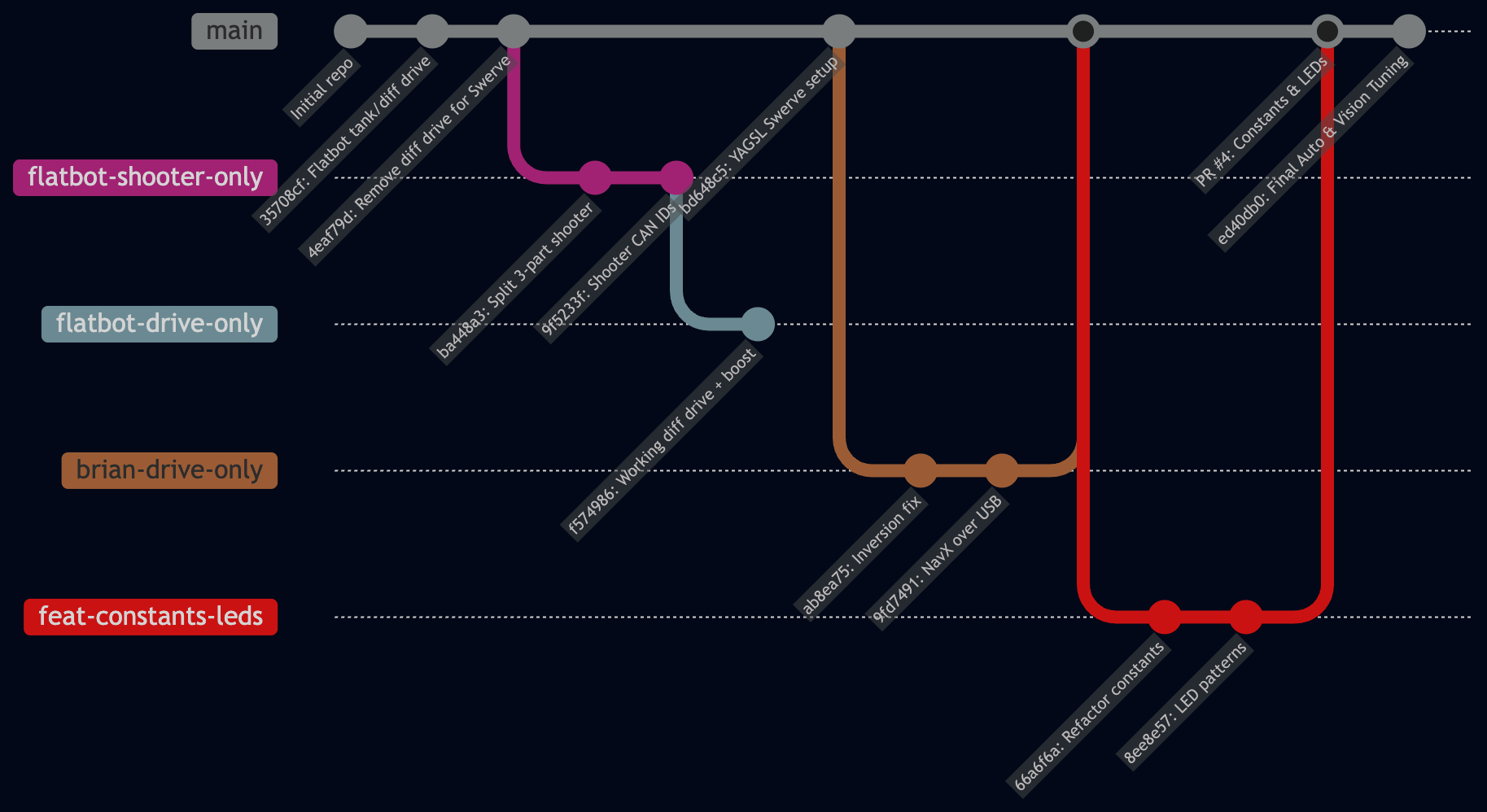
Git Branches
Veer Bajaj
Author
FRC TEAM 5171
Documentation Portal
Enter the team passcode to access protected engineering guides, curriculum, and robot archives.
Passcode
Incorrect passcode. Please try again.
Unlock Documentation
🍪
Cookie & Session Notice:
We use essential cookies to securely remember your authenticated session and unlock status across pages.
Got it, accept